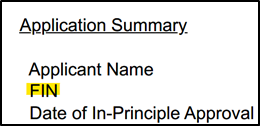
1) I do not know what my FIN number is. Where can I find it?
You may refer to page 1 of your IPA Letter under “Application Summary” for your FIN number.
2) I do not know what is my NTU Matric Number? Where can I find it?
You may log in to your NTU Pass App to view your NTU Matric Number. For more information, please visit NTU PASS.
3) I have not completed both Step 1 (Upload Documents) and Step 2 (Make Payment). Can I still make an appointment?
It is advised to select a slot on a later OSE date to ensure that there is sufficient time for ICA to approve your uploaded documents and payment first. Do note that if BOTH steps are not completed on the day of your OSE appointment, you will NOT be able to complete your STP formalities.
4) I have booked for 8 August Morning Session, but I want to change my appointment to another day/session now. Can I change my appointment?
Please click the 'Register' button at the top right corner of the page again, then select 'Modify My Registration'.
Modification is allowed till 4 August 2025, 11:55PM. (subject to availability)
No further modifications will be allowed after the deadline.
Kindly strictly keep to your latest registered appointment and only turn up at OSE during your registered appointment slot.
For any cancellation of OSE apppointment, please write in to AskOneStop to cancel your appointment with your reason for not attending the OSE.
5) My Short Term Visit Pass (STVP) expires on 5 August 2025 and my OSE appointment is on 7 August 2025. What should I do?
If your STVP is expiring before the day of your OSE appointment, it means that it will not be valid. You will not be able to complete the STP formalities on the day of your OSE appointment without a valid pass.
To ensure that you hold a valid STVP on your OSE appointment date, please extend* it here within 14 days before it expires.
*Kindly indicate the following under REMARKS when applying for STVP extension:
1) Your STP FIN number
2) Your registered NTU OSE appointment date
Please note that overstaying in Singapore is a punishable offence under the Immigration Act.
6) I do not have a physical passport-sized photo ready. Where can I go to have one taken?
You may visit any photo printing shop that offers passport size phototaking service. Do ensure that the photo taken MUST follows ICA guidelines.
There will also be a photography booth within the OSE venue if your photo rejected by ICA or you did not bring a physical passport sized photo during your appointment slot. Please bring along sufficient cash of minimum $15 to pay for the photography service.
7) I have not obtained a Singapore mobile number yet / My current Singapore mobile number is expiring. Is it mandatory to have a valid Singapore mobile number for OSE? If so, can I use a friend’s number instead?
A valid Singapore mobile number is required and must be written on the first page of your IPA letter as SMS One-Time Password (OTP) will be sent out for the retrieval of digital STP within 7 to 10 working days after the completion of formalities at OSE.
If you do not have a valid Singapore mobile number, you may use the number of an authorised proxy (family member, friend, or sponsor etc.) who can receive SMS messages. Please ensure that the owner of the number is informed and consents to its use for retrieving the digital STP.
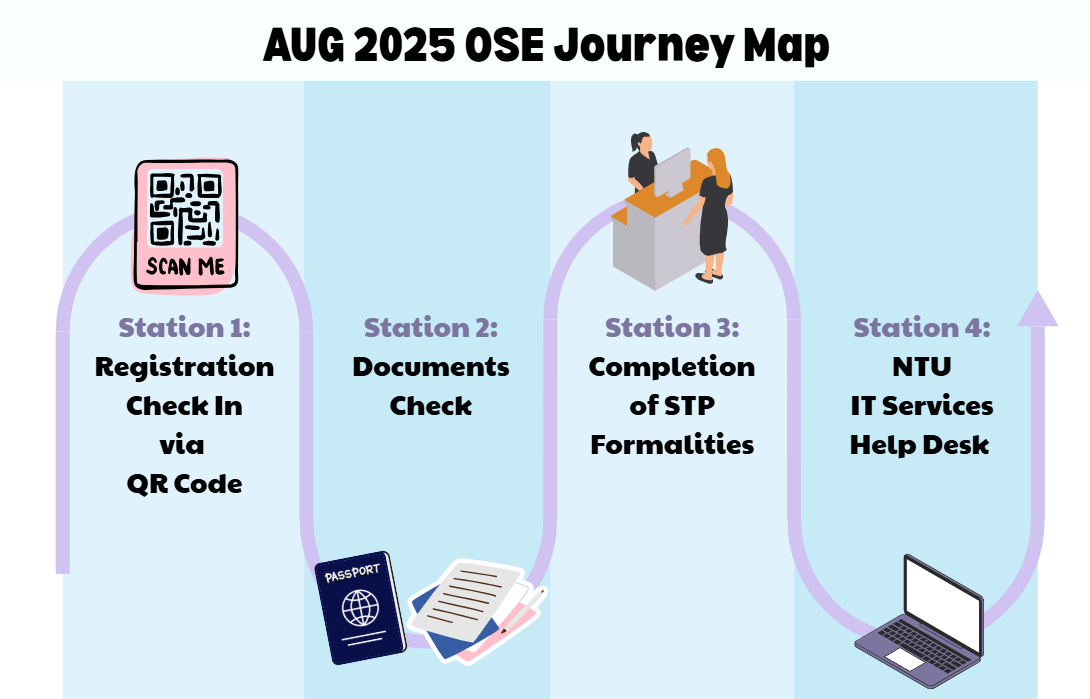
8) What should I expect on the day of OSE?
Refer to the journey map below for more information.
9) How do I retrieve my digital STP after completing OSE?
Upon successful completion of your STP formalities, an email from FileSG (no-reply@file.gov.sg) will be sent to the email address indicated in your submitted eForm16 within 7 to 10 working days. For a detailed Step-by-Step retrieval guide (via Non-Singpass/Singpass option), please refer to Issuance of Digital Student's Pass.
10) I have just retrieved my digital STP but the address in my STP is stated as “One Stop @ SAC”, how do I update to my current Singapore residential address?
You MUST self-update to your current Singapore residential address in the Electronic Change of Residential Address (eCOA) portal. Singpass is required to perform this service.
To create a Singpass account, you may register here 3 days after you received your digital STP via email. If you encounter any issue in setting up your Singpass account, please visit any of the Singpass counters immediately for assistance.
Once your Singpass account is created, please follow the steps below to update to your current Singapore residential address via the ICA eCOA portal:
- After keying in the new address in the eCOA portal, there will be a 6-digit PIN mailer mailed to the new address.
- Once you received the PIN mailer, please key in the 6-digit PIN into the eCOA portal to confirm the change in address.
- Upon successful validation, your new address will be recorded in ICA system.